Categories
Presentation Management

Collect Content

Presentation Management 17

Original content by AlexAnndra Ontra and James Ontra
Enhanced by Geetesh Bajaj

In the last part of this Presentation Management series of posts, we explored how training can start your conversation about presentation management. In this part, we look at how your presentation management strategy can only be as good as the content you collect and provide.

Your presentation management strategy is only as good as the content provided.

Systems, protocols, features, functions, cutting-edge technology, and good intentions are all great. But content is king! Both U.S. Bank and Cooper Standard introduced slide libraries with the best content – branded, up to date, accurate, well-designed, well-written content. When word got out at U.S. Bank that there was a library that had all the good content, and all you had to do was drag and drop, requests for access increased and the presentation management mentality started to spread.

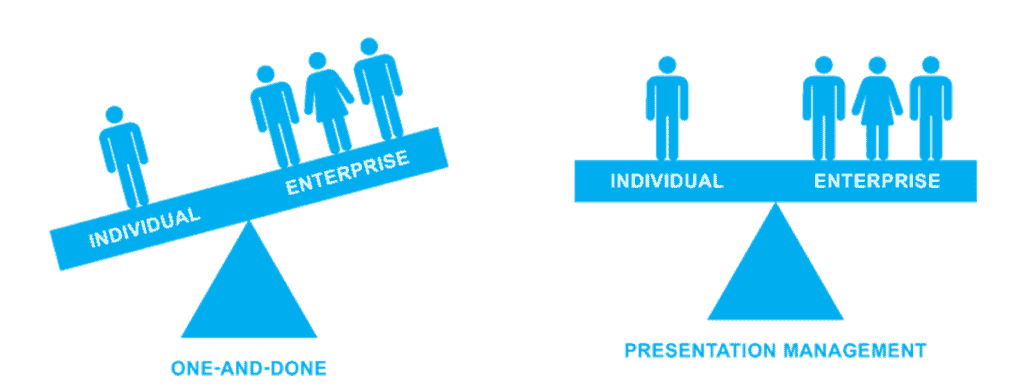
Content is how you balance the enterprise with the individual – the strategic with the tactical.

You can start from scratch and create all-new content. Luckily, that’s not a requirement. Most of this content, enterprise and tactical, already exists. It’s already saved on your network somewhere, embedded in other presentations, brochures, videos, etc. So it’s a matter of identifying it and then including it in your presentation management initiative.

Collect Content

The trick is to make sure that your presentation cloud includes both aspects of your business: the enterprise files and the tactical files, that can then be broken down into pieces where individuals can select and organize a new presentation for their own meeting.

Now you might be thinking something like, “You want me to parse through all of those files on our mess of network? Ugh!”

Content collection may seem like a daunting task, arguably worse than spring cleaning. There are probably thousands of files on your network, so where do you start? It’s really not as bad as it sounds. Big tasks are easier to accomplish when broken down into manageable chunks. There is no one-size-fits-all approach to content, but there are a couple of practical approaches we suggest when helping our own clients execute their presentation management strategy.

The last 50

  • Sort through your network by date, and select the latest 50 presentations (or 100 or 30 or whatever number of files seems right for your organization), and other files that were created. This will give you the most up-to-date content to start with.
  • Review the files.
  • Delete redundant slides.
  • Apply consistent brand standards, i.e., backgrounds, fonts, style, etc., to all files and slides.

  • Organize them into smaller decks based on subject.
  • Include high-level corporate information.
  • Include product and service details.

Delegate to divisions

  • Ask marketing managers from each division to contribute presentation content for their team. After all, they’re the ones who are closest to their product messaging and to their presenters’ needs.
  • Include corporate marketing and communications as their own divisions. They are great sources for enterprise content.
  • Review for duplication.
  • Delete redundant slides and content.
  • Apply consistent brand standards, i.e. backgrounds, fonts, style, etc., to all files and slides.
Tactical Content

Users need slides and files to do their job. The goal of presentation management is to provide that tactical content to them in an easy, effective way. When your team sees compliant, productive content that they need to do their job within their presentation management solution, they will not just warm up to the new solution, they will embrace it. Remember when we talked about starting with “what’s familiar.” Well, your team is very familiar with the content they need to succeed in their job. Give them what they want.

Takeaways

Let us now look at takeaways from the last few posts in this Presentation Management series:

  1. Assign someone or group to own and direct your company’s presentation management initiative.
  2. Launch in phases. Add content in phases. And train in phases.
  3. Start with what’s familiar.
  4. Training is like an ongoing conversation. Provide a range of training options and opportunities for your team to learn about and adapt to presentation management.
  5. Content is king! Give your team the content they need, formatted, and ready to present, and they will embrace your new presentation management solution.

In the next post of this series, we will look at the lifecycle of a presentation.

Categories
Presentation Management

Training Starts the Conversation

Presentation Management 16

Original content by AlexAnndra Ontra and James Ontra
Enhanced by Geetesh Bajaj

In the last part of this Presentation Management series of posts, we explored the culture of presentation content management. In this part, we look at how proper training can help overcome many challenges.

Training provides a two-fold opportunity.

  1. First, it teaches the users how to use the new platform—click here, drag and drop there, etc.
  2. Second, training provides an opportunity to help your team embrace this new communication strategy called presentation management.
Training Starts the Conversation

Cooper Standard is a world leader in automotive and aviation parts with over 30,000 employees. We developed a training program with them that covered the “how” and the “why” for presentation management and included multiple touchpoints to reach such a diverse and geographically dispersed group.

Chris Andrews, the Director of Digital and Marketing Communications for Corporate Communications, and her marketing team of writers and designers created a library of branded, compliant presentations.

  • For their presentation management launch, Andrews served as the presentation director and her team acted as the presentation task force.
  • They started their slide library with high-level information about product lines, including sealing systems, fuel- and brake-delivery systems, and fluid-transfer systems.
  • They also included a slide about each facility. And then, the team started talking with their division and regional leaders about presentation management.

Here’s how Andrews’ team approached the task:

1. Training the influencers

Once Andrews and her team had a foundation for their library, they scheduled sessions with the regional leaders in North America, South America, Europe, and Asia. Since the attendees were joining from four continents, Andrews’ team conducted the sessions via web meeting.

We showed them Shufflrr’s features and functions, but more importantly, Andrews discussed why Cooper Standard was moving toward a presentation management platform, and how this new platform was going to make it easier and better for employees and partners to distribute and share accurate and branded slides all over the world.

While the products may be the same, business protocols and cultures are very different from country to country. So, Andrews asked each attendee how he or she thought it would affect that region and how the system should be rolled out. For example, Asia required a different language and alphabet. So, we worked specifically with that director to tailor a separate training program for the Asia region. The meetings were less how-to tutorial and more conversation. Everyone participated.

2. Training the users

With such a dispersed group, our team at Shufflrr collaborated with Cooper Standard and created several means of training with different touchpoints.

The first and, we believe, most impactful was in-person classroom training. We hosted several training sessions in different offices around Michigan, where Cooper Standard is headquartered. Those who could not physically attend could log in through Webex.

Andrews began these sessions with the reasons Cooper Standard launched a presentation management initiative. She explained to her colleagues that presentation management would make it much easier for them to assemble a presentation.

She started each session by showing off all of the new content that her team had created, the library of polished, professional product and facility slides, the videos, and other materials that were now so easy to find and use. She also emphasized that the slides in the library coincide with Cooper Standard’s larger brand initiative. Users could get their jobs done and build the company’s image. It balanced the enterprise marketing goals with the daily needs of employees.

We then showed them how the system works. However, with every feature demonstration, we gave a reason why that feature was important. We showed them how to receive a slide update, but we also explained that slide updating would ensure that they had the latest, branded version of that slide. Since Cooper Standard is continually innovating, slide updating is a feature that users will want so they can keep up.

3. More web training

It’s impossible to get everyone in the same room or on the same webinar. This is also true for smaller companies. We scheduled multiple sessions across several months to give everyone an opportunity to participate.

4. Ask for feedback

Andrews understood that training doesn’t end with the session. It’s easy to lose people’s attention once they leave a meeting. Her team sent out a survey asking for feedback and suggestions on the presentation management program and the training sessions so we could improve as we continued. The request for feedback is a means to keep the conversation going.

5. Make it fun and rewarding

Adoption is usage, and the marketing team needed to get their colleagues to embrace and start using the new presentation management solution. So, marketing created a contest.

  • The game consisted of a series of exercises to complete in Shufflrr, using features and functions highlighted during training sessions. The catch is that they hid a slide in the library, the Golden Slide.
  • As part of the game, aka practice exercises, users were asked to create a new presentation that included the Golden Slide and send it back to Andrews using Shufflrr’s share feature.
  • To play the game, they had to search, preview, drag and drop, save a new presentation and share. They had to use and learn their tool’s features.
  • Those who completed the task got a prize. While playing the game, employees were learning how to use their new slide library. And they could win cool stuff.

6. Training materials

With the understanding that you will never get everyone with one program, Andrews provided her colleagues with how-to videos, long-form recording of live training, and cheat sheets. The idea is that anyone can reference any of these materials within their presentation management system when it’s convenient for them.

Andrews and her team at Cooper Standard understood that training is an ongoing conversation. She did not expect a global team to change their habits and thinking around presentations after one 45-minute session. She also understood that it’s not a one-way lecture. She engaged her colleagues, each group at their own level, and step-by-step, encouraged them to think differently about the role of Cooper Standard presentations within the company.

Launch in Phases

Launch in Phases

If your company is a large enterprise with 1,000-plus users dispersed over several different divisions, start small. Pick a subset—one division and its content. First off, it makes content collection easier. You only have to collect and organize content for one product instead of 15. Second, a pilot team of 50 instead of 500 is much easier to manage. It gives you an opportunity to work out the kinks before going live to the entire organization.

When U.S. Bank started deploying presentation management, its objective was to implement the solution across the organization, for 1,000 users. But it started small, with 100 users, and progressively added content and users every month. The bank hosted regular training sessions for new users and was able to accept feedback and make changes as it went along. Management created a cycle to:

  • Add content,
  • Train,
  • Get feedback,
  • Adjust,
  • Add more content,
  • Train another group,
  • Get feedback,
  • Adjust, and
  • Keep going.

It was a step-by-step process of managed growth. Through that process, the bank onboarded its goal of 1,000 users and then got 500 additional requests to join the system. Word got out, and presentation management spread throughout the bank.

In the next post of this series, we will look at how your presentation management strategy is only as good as the content provided and collected.

Categories
Presentation Management

Culture of Presentation Management

Presentation Management 15

Original content by AlexAnndra Ontra and James Ontra
Enhanced by Geetesh Bajaj

In the last part of this Presentation Management series of posts, we looked at how we can make our presentation content intelligent. In this part, we explore the culture of presentation management.

Change is hard, especially in a large organization. People are afraid of the unknown. The familiar is our security blanket. Knowing where we will be and what we will be doing tomorrow makes us feel safe. Any effort to change that, especially in our jobs–our livelihoods–will be resisted.

This is one of those strange ironies of life. Most of us know that change is imminent, and we still resist change. Here’s a famous quote about change.

Remember that the only constant in life is change.

– Gautama Buddha

Now, we are not using that quote to further the dialog about change. However, over the years, as we’ve worked with clients to launch their new presentation strategy, we’ve found that there are a few steps you can take to help your team embrace presentation management:

  • Some of them are concrete, like training.
  • Others are more psychological, like how to change someone’s predisposition toward doing things a certain way.

In this post, we will discuss the approaches you can take to lead your team into a presentation management culture. And these approaches will also help you jump-start your presentation initiative.

Culture of Presentation Management
Image: One of the photos in collage by Gabriel García on Scopio

Presentation management has two core tenants, and every step you take in your presentation management initiative should ultimately lead to those objectives. Revisit these tenants from time to time to make sure you stay on track.

  1. Transform your presentations from one-and-done tactical files to enterprise assets.
  2. Balance the long-term enterprise objectives and the individual needs of everyday employees.

The goal is to balance the presentation needs of both the individual and the enterprise

Balance the presentation needs

Director of Presentation Management

Presentation management is a disciplined approach to executing that strategy. The strategy guides who in your organization can present what message, to whom and when. It balances the objectives of the enterprise with the individual’s needs. The approach is similar to any other marketing communications discipline, like advertising, public relations and event marketing. It has a similar process:

  1. Define objectives,
  2. Plan,
  3. Execute,
  4. Measure, and then
  5. Revise

The director of presentation management, with the help of strategists, should spearhead your company’s presentation management effort.

This person, or task force depending on the size and complexity of your company, should:

  • Have an understanding of your company’s messaging and branding.
  • Be able to ensure that the presentation material is consistent with the company’s mission.
  • Also have an understanding of the company’s product and service lines to determine what kind of content to include in the library.

Your presentation director should be a relatively senior executive who understands the business, its subdivisions, and has a sense of what the team members need to succeed in their roles. This is a role that probably already exists in your company. Some individual or a group, usually in marketing, has taken on this task by default because it’s important.

Think of a museum curator who assembles the best collection of art. The presentation director is going to curate the best collection of your company’s slides. He may source corporate communications to get high-level content about the company. Then, to address the day-to-day presentation needs of individuals, the director can source content about specific products and services. In bigger companies, the presentation director usually delegates this task to managers from each division.

Director of Presentation Management
Image: Collage created using pictures from Pickit

Cooper Standard, a global enterprise with over 100 locations across four continents, sourced content from each product line and region to create a comprehensive library.

Yes, you must get the content from the subject matter experts, wherever they are. Once the content is collected, the director can organize the high-level corporate content with detailed product content into one central cloud location.

A presentation director is the curator of presentation content.

Promote the Benefits – It’s PM for Them

Appeal to your employees’ self-interest. Let your team know how presentation management will make their presentations better and easier.

U.S. Bank – Deploying a Presentation Management Solution

Shufflrr US Bank Case Study

U.S. Bank surveyed its team members to understand their presentation pain points before choosing a solution.

The bank found that, above all else, users really needed an easier way to find approved slides, so they wouldn’t be forced to create their own.

When the bank was ready to launch presentation management, management was able to communicate that this new presentation initiative would standardize content, push out slide updates, and save time when preparing decks. That’s what the users needed, so management led with their needs.

Read more about how various companies deployed presentation management solutions at the Shufflrr Case Studies page.

Show Them It’s Familiar: “You Already Know How to Do This”

Once employees understand how presentation management makes their work-lives better, show them that it’s already familiar. If you want your child to eat more fish, you don’t serve her steamed sea bass with capers and onions in a spicy tomato sauce. You start with fish sticks because fish sticks are pretty close to chicken fingers. And all kids like chicken fingers.

Draw similarities to what employees already know and do. For example, presenting in interactive mode, where they are pulling up slides on the fly, might seem intimidating. They lose the familiarity and structure of their linear PowerPoint. But they already tell stories through interactive presentations every day in their personal lives, especially if they’re Millennials (see what Robert Gaskins, the creator of PowerPoint says about Millennials).

Here’s a familiar scenario that shows what we mean:

Suzanne and John are best buddies, but they haven’t seen each other in a while. After rescheduling multiple times, they’ve finally caught up for dinner and drinks.

Standing at the bar, while waiting for their table John asks Suzanne, “How was your vacation?”

“Amazing!” Suzanne responds with delight. “We took the kids to Disney World. Funniest thing, my 4-year-old, Eric, has a huge crush on all of the Disney Princesses.”  She takes out her phone and starts scrolling through pictures. “Look at him blushing with Cinderella. Too cute!  He’s going to be mortified by this when he’s older. And then we left the kids at my folks and hit the beach for a few days to reboot.” Suzanne shows a few more pictures of her and her husband enjoying a romantic dinner.  “How about you?”

“I have a job interview in two days at Acme Company. It would be a promotion and a raise. I’m so sick of my current job right now. I need to nail this.”

“My friend used to work at Acme. Who are you meeting with?”

“Mike Whatshisface, he’s the SVP of marketing,” John replies. Suzanne starts the recon. She sends an inquiring text to her friend and does a Google search to get some more info on Mike Whatshisface.  They both look at Suzanne’s phone.

They pull up his LinkedIn profile and see that he started out in sales. Suzanne advises John, “The guy has a sales background. Better talk about your experience in terms of results.  You know, focus more on the results you’ve achieved and less about the process and details.”

Then they go to Google images and find a picture of Mike Whatshisface and his wife at a charity event.

Meanwhile, Suzanne’s friend replies to her text with a bitmoji of her running in fear, “Mike Whatshisface is a total jerk. Tell John … Run awaaaay!”

They both break out in laughter and order another round of drinks.

That’s an interactive story, using a mobile phone to present “slides” as the conversation unfolds. The content on your phone is formatted to present. Your phone is essentially a slide deck with the presentation following the conversation. When discussing interactive presentations, draw comparisons to what’s already familiar.

Other aspects of presentation management should be familiar to most people, too. Your team already knows how to search and shop for stuff on Amazon, put pictures of items into a shopping cart, and buy with one-click. Well, with a new presentation management initiative, employees are going to be able to do the same thing, except with slides instead of items, which users will save into a new deck instead of a shopping cart.

In the next post of this series, we will look at how training will help you start the conversation about presentations management.

Categories
Presentation Management

Making Presentations Intelligent

Presentation Management 14

Original content by AlexAnndra Ontra and James Ontra
Enhanced by Geetesh Bajaj

In the last part of this Presentation Management series of posts, we looked at how better storytelling can make your content stand apart. In this part, we look at making your presentation content intelligent.

At first, presentation management might seem like taking PowerPoint and other files and putting them on a cloud with a few frills. But there’s another aspect of presentations that comes alive once they are managed in a cloud environment where they can be tracked.

Presentations throw off data. Every word and pixel is data. Every time a slide gets used, the data can tell us who used it, and where and how it was used. The data can tie sales presentations, for instance, to deals closed, which means the data could show which slides helped sell the most.

All of that data can be captured and analyzed in ways that help make every presentation better.

Where do you get the data?

Reports in Shufflrr

Yes, data can be helpful, but where do you get this data from? The answer is Reporting.

Any Presentation Management solution contains a Reporting module. For example, Shufflrr’s Reporting module has many reports, including the DashboardFileSlideUserActivityLikesComments, and Shares.

Presentation management tracks the usage of files and slides in different scenarios. This provides a concrete understanding of what files, what messages and what products are being used and by whom.

Data can be captured and analyzed

Additionally, Presentation management includes social tools for users in the field to give feedback in real-time, associated with actual content and activity. Users can comment and collaborate on files and slides through conversation threads, comments, likes, etc. in real-time, spontaneously. It’s like Facebook, except for marketing material instead of someone’s vacation.

As Alex says:

I know I’d rather look at sunsets on a sandy beach than last quarter’s sales figures, too. But we need those sales to afford the beach vacation.

The combination of data and anecdotes from the field provides a full picture of how the content is performing, and where and how to make adjustments to your message and content as your business evolves.

Machine Learning and Modeling

Artificial Intelligence is about organizing enormous amounts of data, drawing conclusions and acting on them. Again, where does this data come from? The ubiquity of mobile technology has made it possible to collect data from millions of users’ activity, then analyze and apply it to some purpose.

  • For Amazon, this means suggesting products for you to buy based on what you purchased last month, and what you’re browsing through today.
  • For Google, it means finishing phrases, suggesting search terms based on what you just started to type into the search window, or based on what ads or articles you clicked on.

These actions are tracked, and the data collected.

The more actions are tracked, the more data gathered, the better AI can make “suggestions” or predict actions and behaviors. Then those actions are further tracked, analyzed and as a result, AI can fine-tune and improve. AI builds on itself, over generations of data.

Acronyms: ML and AI

The technology industry loves acronyms, and AI has almost become part of our vocabulary. ML is less popular, but related.

Let’s list their full forms:

AI: Artificial Intelligence
ML: Machine Learning

It is through ML that AI gets more intelligent and richer. And like we say in the real world, “Learning never stops;” that’s true for ML or machine learning too!

Shufflrr, as a presentation management platform, uses both ML and AI, but did you know that PowerPoint also uses both to help you create slides? One example is the PowerPoint Designer feature.

Not surprisingly, this AI applies to presentations. That’s because presentations are no longer one-and-done lone files; they are enterprise assets. The same files are used and reused throughout many different scenarios, and results are collected, tracked, and analyzed. It’s the foundation for intelligent presentations — what we call Predictive SlidesTM.

Predictive Slides will suggest which files and slides you should include in your new presentation based on who you are, to whom you are presenting and what you have presented in the past. During meetings, Predictive Slides will suggest slides based on how that conversation is progressing. This is the future of presentations, and we’ll get into much more on that in subsequent posts of this series.

Machine Learning and Modeling

In the next post of this series, we will look at the culture of presentations management.

Categories
Presentation Management

Presentation Management Options

Contrary to popular belief, Lorem Ipsum is not simply random text. It has roots in a piece of classical Latin literature from 45 BC, making it over 2000 years old. Richard McClintock, a Latin professor at Hampden-Sydney College in Virginia, looked up one of the more obscure Latin words, consectetur, from a Lorem Ipsum passage, and going through the cites of the word in classical literature, discovered the undoubtable source. Lorem Ipsum comes from sections 1.10.32 and 1.10.33 of “de Finibus Bonorum et Malorum” (The Extremes of Good and Evil) by Cicero, written in 45 BC. This book is a treatise on the theory of ethics, very popular during the Renaissance. The first line of Lorem Ipsum, “Lorem ipsum dolor sit amet..”, comes from a line in section 1.10.32.

Categories
Presentation Management

Better Storytelling

Presentation Management 13

Original content by AlexAnndra Ontra and James Ontra
Enhanced by Geetesh Bajaj

In the last part of this Presentation Management series of posts, we looked at how interactive presentations can help access content easily and quickly. In this post, we will explore better storytelling techniques that can make your presentations even more interesting and captivating.

Stories are powerful for communicating, teaching, motivating, and learning. That’s because stories draw on emotion and scenarios that resonate with us on a visceral level. Better stories get people to act.

Stories are Powerful

Presentations are Stories for Business

A good presentation tells a story about your business. It could be about the entire business or just one product. With your interactive slide library at your fingertips, you can tell a better story, based on your customer’s immediate feedback, on the fly.

You have the ability to present content that you know will appeal to your customer, and you can adjust the story as you learn more about your customer’s situation. By creating a more relevant presentation, you are telling a better story.

The best presenters are great storytellers. They instinctively know how to draw their audience’s emotions to engage them in their message. Presentation management can help all of us, even if we’re not natural storytellers, to tell our company’s story.

Presentations Are Corporate Storytelling

Storytelling is the most important facet of effective presentations. Unfortunately, in the age of PowerPoint, many presenters rely too much on technology and forget how important stories are. To get the results you’re looking for, build your presentations on a foundation of great stories—not the other way around.

James Ontra, Shufflrr

Read more in this post, The Art of Storytelling: Presentations Are Corporate Storytelling.

Corporate Storytelling

Back in 2003, this discipline helped Screenvision sell a new product, called Screenvision Premier, to an old industry of traditional advertising agencies. Screenvision Premier branded the movie theater. Sure, advertisers were willing to pay to project their ads on a big screen to play for a captive audience before the movie started. But what about the rest of the theater, like the lobby space where everyone milled about? Or the popcorn bags and soda cups? Screenvision had the means to brand all elements of the movie experience, but they had to sell it to advertisers. Imagine the media buyer’s incredulous response to a junior Screenvision rep:

You want me to do what with a bag of popcorn?

Using 3-D imaging of the movie theater, complete with moviegoers walking around the lobby with branded bags of popcorn, the junior rep was able to communicate the value of this program.

Your product and logo look great on the popcorn bag that your customer will hold on his lap for 2½ hours.

The imagery helped tell the story of Screenvision Premier. It simplified the message and equipped the sales team to sell a new, novel idea.

In the pharmaceutical world, telling the AdComm about the patients who participated in a trial and how their condition improved — complete with pictures and videos — tells the human story of that drug’s impact. The panel will not see the human element through a bunch of hard data, line graphs, charts, and diagrams of molecules. The panelists need to understand the human element — the emotion that moves people.

Presentation management makes great stories accessible to everyone, so whether or not you have the personality of a late-night talk show host — and let’s be honest, most of us do not — you can still tell a story through a presentation that resonates and stirs the audience to act.

In the next post of this series, we will look at making presentations intelligent.

Categories
Presentation Management

Interactive Presentations

Presentation Management 12

Original content by AlexAnndra Ontra and James Ontra
Enhanced by Geetesh Bajaj

In the last part of this Presentation Management series of posts, we looked at how presentation management transforms content: employees create new content from existing content, and both internal and external usage of content gets easier. We will move ahead in this post and look at interactive presentations.

Let’s explore one facet of the pharmaceutical industry. The cost of creating a successful new drug is anywhere from $650 million to $2 billion. The price tag is so high because the hit rate is so low: 90 percent of drugs developed don’t make it to market. Few drugs make it through all three phases of clinical trials, and when they do, they still need to get FDA approval.

Advisory Committee

Most drugs are developed after a huge financial investment, years of clinical testing and trials, and a ton of time invested by a team of passionate medical professionals, scientists, and even patients with a genuine interest in curing a disease. And after that arduous process, the approval decision hinges on one presentation to an FDA Advisory Committee.

An Advisory Committee, or AdComm, is a panel of experts with special knowledge of the disease the drug is targeted to treat. The AdComm is usually made up of doctors, scientists, patients, and industry and consumer representatives. The stakes are high, so naturally, the panel needs the right information about the drug and its trial results to make good decisions. It’s up to the presenter — the drugmaker — to give the panel that information during the AdComm review.

We worked with a consultancy called Innovative Science Solutions (ISS) that helps drug and medical device companies get AdComm recommendations for FDA approval. ISS relies on interactive presentations during meetings to do so. All the trial results are compiled into a slide library of more than 1,000 slides. The content tells the entire story of the drug, from its creation in the lab to its compound structure, its chemical reaction in the human body, as well as the methodology, preparation, execution, and results of each clinical trial. The slides include testimonials from patients who participated in the trials. The slide library is like a comprehensive encyclopedic reference for that one drug.

ISS prepares the presentation. It chooses 100 to 200 slides from the library that the Chief Development Officer (CDO) for the drug company will then present to the Advisory Committee.

The AdComm format in and of itself is intense. It is several days with everyone in a hotel conference room or some other neutral location. The CDO presents a formal, linear presentation of results and rationale for approval. That presentation is then followed by several days of questions and answers. Panel members ask about any aspect of the drug, and the CDO is expected to answer in detail. And he can, because he has an interactive slide library at his fingertips. No sooner does the AdComm expert ask a specific question about the chemical composition of the drug than the CDO can search and present the slide with detailed information and a diagram of the compound.

Maybe then another panel expert asks about the methodology of Phase II trials. The presenter can switch and quickly find and project slides about Phase II trials. As Steven Weisman, co-founder of ISS notes:

Speakers are always presenting in high-pressure situations that require them to think on their feet and retrieve content quickly when asked. One misstep can drastically lower the odds of approval – costing companies millions of dollars.

Interactive presentations allow for back and forth, real discussion, between the presenter and the panel experts. The presenter can offer detailed, accurate information showing the AdComm that this drug has been properly developed, tested, and is ready for market, while the AdComm gets the information it needs to recommend FDA approval.

The presentation follows the conversation.

Pharmaceutical Industry

Interactivity lets you manage the presentation during the meeting. It is more in line with how people think. Our minds are not linear. Even when we are focused on something, our minds still wander. Adjusting the meeting to your audience’s wandering mindset will help you engage, educate and ultimately convince people to act, which is what presentations are really for — incenting action.

Here are some thoughts:

  • Interactive meetings are more productive meetings.
  • We learn how to better serve our clients and business partners when they are sharing their knowledge and concerns with us.
  • When the presenter and the audience are both forcing themselves through a linear list of preconceived slides, it severely limits engagement, participation, and feedback. Feedback is how we learn more about our clients’ and colleagues’ needs, so we can offer a better solution.
  • The ability to adjust the content on-demand, during the meeting, and provide accurate information about a colleague’s issue will push a sale or an FDA approval further along. The presenter doesn’t have to say, “I’ll get back to you on that,” which will add weeks, even months to a deadline.
  • Interactive presentations empower presenters to cover more and do more, in the same amount of limited meeting time.

Interactive meetings elevate the presenter. When you answer your customers’ issues on-demand, you are perceived as smarter and more sincere. You are showing your customers that you are genuinely concerned with their problems, and you know how to solve them. In so doing, you elevate yourself from salesman to partner. Typically, CEOs and other senior-level executives can answer questions off the cuff. With interactive presentations, you are giving everyone in your company that ability. A junior sales rep looking for a deal can come across like a smart and trusted partner. Clients buy more from smart people whom they trust.

Interactive meetings can positively affect your bottom line.

Using Shufflrr for Events

All this talk about interactive presentations led to this question, that I asked James: How does a presentation management solution like Shufflrr help in delivering interactive presentations at AdComms or other events?

And here is his answer: I can’t tell you how many times I’ve been at conferences where something goes wrong with the presentations. Managing presentations at conferences is no easy task — some have upwards of 100 speakers in a dozen different rooms. We’re excited to be offering our solution that has been proven successful for the companies for which we manage presentations, to those hosting conferences. This will save them a lot of time and money – and some speakers a lot of embarrassment.

Learn more on the Shufflrr Events page.

Shufflrr Events

In the next post of this series, we will look at how better storytelling can improve your presenting experience.

Categories
Presentation Management

How Presentation Management Transforms Content

Presentation Management 11

Original content by AlexAnndra Ontra and James Ontra
Enhanced by Geetesh Bajaj

In the last part of this Presentation Management series of posts, we looked at how presentation management balances both sides of the enterprise: the high-level corporate brand and objectives with the everyday tasks of the employees out in the field. In this post, we will take the concept further and explore how content gets transformed as a result of presentation management.

Once cloud storage, active files, slide libraries, visualization, and search are up and running, anyone at your company can use it to build better presentations using the best content from your best people. And as that discipline spreads throughout your organization, you will notice some very interesting effects on the culture of presentations.

The old idea of one-and-done presentations fades away, and a new culture of reuse takes over. And the more a file and slide are reused, the more productive they become, and the higher the return on your content investment. Here are other ways the concept of presentations changes after the implementation of presentation management.

Employees Create New Presentations from Existing Content

Employees will use a slide or file many times over again in different presentations for different meetings. More bang for your buck. Find the slide and file you need, when you need it, and then create a custom presentation using that file or slide. Presentation management strategy expedites this process.

Also, when this slide gets updated, employees can get an updated deck almost instantly. So if you had fifty or five-hundred employees using this same slide, editing the slide once could push updated content to all of them.

Employees Create New Presentations from Existing Content

Internal and External Usage Gets Easier

When companies think of enterprise, they think internal for their employees only. That’s great for company employees who are collaborating on a project and can all access the material and review it together through the same drive. But presentation management also includes external usage. Those same files, accessible from the same repository, can be shared on-demand with a client or partner outside of the enterprise. Presentation management includes the ability to share and collaborate externally, via shared links, webinars, or chats.

Internal and external usage is controlled through permissions and security. So, your company can still manage how, where, and with whom files and slides are shared. Confidential information will stay that way. One version of the content – one source of truth — can be used in multiple scenarios. This limits the need for multiple versions in different locations. One enterprise asset repurposed for different needs.

Internal and External Usage Gets Easier

Presentation management can change the overall meeting experience. Old-school linear presentations, prepared the day before and followed slide by slide, force the presenter to talk at his audience. No one likes to be talked at. With accessible files, the presenter can comfortably go “off-slides” because he has the content to support his message. At the same time, the other meeting attendees are encouraged to participate and contribute to the meeting. The result is less proselytizing and more conversation, which means that more information gets shared and everyone is more productive.

The presentation follows the conversation.


Quiz

First, try and answer these questions. Feel free to read the post again if needed. Then, scroll down to below the author profiles to find the answers.

Q1: Cloud storage, active files, slide libraries, visualization and search: these are all components of presentation management. Is this true or false?

Q2: How can files placed within your presentation management platform be shared on-demand with a client or partner outside of your enterprise?


Quiz Answers

A1: Yes, this is true. Presentation management is a technology that’s encompassing.

A2: Presentation management includes the ability to share and collaborate externally, via shared links, webinars or chats.


In the next post of this series, we will look at interactive presentations.

Categories
Presentation Management

Enterprise Files for Everyday Use

Presentation Management 10

Original content by AlexAnndra Ontra and James Ontra
Enhanced by Geetesh Bajaj

In the last post in this series, we looked at how important compliance is in presentation management. In this post, we explore how components of presentation management can help you achieve the availability of content seamlessly, every day.

Presentation management balances both sides of the enterprise: the high-level corporate brand and objectives with the everyday tasks of the employees out in the field — the folks whose day-to-day tasks are what actually build the business. Presentation management makes enterprise files available for everyday use and vice versa. It’s like a merger of content. To achieve this requires three key components:

  1. Cloud-based technology that can store, update, and track presentations;
  2. Analytics and machine learning that can recognize patterns in and the effectiveness of presentations; and
  3. A cultural shift toward thinking about presentations differently.

These components, when combined, will change the nature of presentations in your organization.

Enterprise Files for Everyday Use

Components of Presentation Management

Modern technology is the backbone of a great presentation management strategy. Of course, we at Shufflrr built just such technology and would like to sell it to you. But whether you buy it from someone else or build it yourself, the discipline of presentation management requires a few key elements.

1. Central Cloud Location

Amazingly, in this era of ubiquitous cloud computing, most companies don’t have a central cloud repository of presentation slides. Slides get stored everywhere:

  • Individuals keep decks on their laptops.
  • Some groups might share a Google Drive or dump presentations into a shared Dropbox account.
  • Some companies used SharePoint’s Slide Library, which has been discontinued.

But whether we’re talking about a small business or a Fortune 500 corporation, it’s rare to find a single, organized, sophisticated cloud solution for presentations.

It might seem obvious, but if slides are scattered in all sorts of pockets of storage, they can’t be shared, reused, and monitored for compliance and consistency. The only way to get this party started is to get all presentations into one place in one location, preferably a cloud drive that anyone with permission can access.

So, here are some steps:

  1. Establish or buy (from us!) a central presentation repository and upload all of the company’s presentation files. Remember, these files are not limited to PowerPoint; they could include video, images, brochure PDFs, etc. When we refer to presentation files, we are talking about anything that can be presented.
  2. Make this library accessible to everyone in your organization with the proper permissions. Permissions are important because they direct users to the content that they need, and they help manage risk and ensure compliance.
  3. Dedicate a person or group to guide presentation strategy and direction. The presentation directors are responsible for ensuring that the presentation management strategy is planned and implemented in your company. Think of it like an advertising director who is responsible for all of the development, execution, and measurement of the company’s advertising, or an event manager who is responsible for selecting the conferences and ensuring that the right employees are attending with the right collateral. We’ll go deeper into what skill set a director of presentation management should have in a later post. But for now, our point is that someone in the company should own the presentation strategy.
Components of Presentation Management

2. Active Files

Once presentations are in the cloud, the next step is to make them “active.” That means making them visual, searchable, accessible, and reusable. They are permissioned, and their use is tracked. Visual files are files that are formatted to present. You can preview for yourself and present them to a client all from the same place.

Search is a pretty standard feature (we peak more about Search later in this post), but we all know that some search engines are better than others at helping you find content you need. Combine search with visualized results, and you’ve instantly solved one problem: how to help employees find the right slides for their decks.

Accessible files are ones that your team can get to easily. Permissions enable accessibility because they direct users to content that is relevant to their job. And finally, reusable files refer to the ability to take a file or slide from a file and put it in a new presentation without a lot of hassle. For our clients, we provide a tray where users can drag and drop files and slides, put them in order, and then save them out as a new file. It’s like an Amazon shopping cart, except you are shopping for slides, and other content, instead of stuff.

In contrast, the opposite of active files are dormant files — files that are hidden, asleep on your network somewhere, and are hard to find. Active files, on the contrary, are ready to work — ready to present — from anywhere, anytime. A sales rep presenting at her customer’s office can find and access the files and present them within seconds. Or she could share a large-file video with her colleague across town.

3. Slide Library

Going back to the mid-1990s, every solution we developed for our clients has had a slide library. It’s the foundation of presentation strategy. Whether your build one or buy one, a slide library becomes the catalyst for changing files from one-and-done to enterprise assets.

A slide library is a critical component of presentation management because it makes files really easy to reuse. It makes them active. Your employees don’t want to just grab a whole presentation and use it as is – rarely does an entire presentation used in one setting fit another time and place. Employees instead need a library of finely crafted, approved slides that they can draw from to create their own presentations for their own situations. In a slide library, your files are broken down into their elements. A PowerPoint deck will show all of the slides separately within that file. So you can pick and choose the slides you want. A video will appear already formatted as a slide, ready to play. The system will show a Word doc or PDF in its entirety, but with each page broken down, so again you can pick and choose which pages you need.

Now, you’re probably thinking, I can already do that in PowerPoint and Word — just highlight what I want and copy and paste into my new file. So what do I need a slide library for?

  1. First, with a slide library, all files are formatted and ready to present. You can review all the slides, files, pages, videos, etc., with one click. It lets you preview all files side by side, or toggle easily from one to the other, and then another, without a big mess of 20 open documents cluttering up your desktop screen. So you can find exactly what you are looking for.
  2. Second, once you’ve found what you’re looking for, a slide library has functionality to let you select content efficiently, with drag-and-drop or one-click to select individual slides, videos, etc. into your new presentation. This is much more efficient than scrolling through a bunch of open files on your desktop. You can see it, move it, drag-and-drop it, put it in a specific order, and save it.

Presentation management breaks the larger files down into pieces, so users can access the pieces that they need to customize their new presentation.

4. Visualization of Files

A key to presentation management is how it visualizes the files to make them so much easier to preview and read through.

You can see into slide 35 of an 80-slide deck, or page 76 of a 200-page white paper, right there in the cloud drive, without opening any files or software. The same is true for video and other file types.

In Shufflrr, we offer at least five different views in three sizes. Users can view one slide enlarged to full screen, or all of the slides in one presentation, or several presentations next to each other, so they can compare and contrast content. Furthermore, the visualization extends to the new file you are creating. As you mix slides, videos, and images, you can see how your new presentation flows and you can make changes accordingly. That seemingly innocuous task can actually save hours in a user’s preparation time. Visualization makes the files accessible and active.

With visualization, you can see the file and decide in seconds if it’s right for your purpose. It’s formatted and ready to present. In presentation management, every file is visual, every file is a slide.

5. Search

In presentation management, search encompasses not just file names and meta tags, but text within the file, titles, body copy, speaker notes, etc., with mechanisms to sort and filter. It’s all searchable, and search criteria is customizable. In Shufflrr, all PowerPoint decks are indexed when they are uploaded into the app. Content administrators don’t have to do anything extra to make the files searchable.

Let’s say you need to create a presentation about cats. Just like when using Google, you input the term “cats” in the search window. Search results return all files, slides, and folders with the word “cats” in them. But unlike Google, the results are visual. You get a little preview of each slide or file so you can review it without leaving the page or window, and then you won’t have navigate back again if you choose the wrong slide. It’s all contained within the same window.

Search

Quiz

First, try and answer these questions. Feel free to read the post again if needed. Then, scroll down to below the author profiles to find the answers.

Q1: What is the main purpose of presentation management in an organization?

Q2: Why is a central cloud location important for presentations?


Quiz Answers

A1: To make presentation files easy to find, reuse, and keep consistent across the company.

A2: Because it keeps all slides and files in one place so employees can access and use them easily.


In the next post of this Presentation Management series, we will look at how Presentation Management transforms content.

Categories
Presentation Management

Ensure Compliance

Presentation Management 09

Original content by AlexAnndra Ontra and James Ontra
Enhanced by Geetesh Bajaj

In the last post in this series, we looked at how presentation management can increase productivity. And in this post, we explore something that goes along with productivity: compliance.

Compliance can mean different things to different organizations:

  • In finance and pharma, it means that specific language and statements are disclosed in accordance with federal regulations. You must tell your customers “this,” but you are not allowed to tell them “that.” What employees can and cannot say is regulated. And “who” can and cannot present certain material is also regulated. In finance, you must be a certified broker-dealer to sell investments. In pharma, you might need to be a medical doctor to educate other doctors about how to administer a particular drug.
  • In marketing, compliance means that you are staying true to the brand, which refers to the colors used, the logo treatment, the fonts and typography, even certain messages and taglines.
Compliance

Compliance can also mean that the products and pricing are up to date. Every industry, every business, every division within that business has rules that they follow, with which they must comply. When we refer to presentation compliance, we are making sure that all of the content presented follows those rules, whatever they may be for your company.

In the discipline of presentation management, compliance is controlled through a number of elements working in concert.

Permissioned Access

Who gets access to which content is important for two reasons:

  1. First, it ensures that qualified people have access to their information. You wouldn’t want a research assistant presenting company financials. That’s a lousy way to prove the company is a sound investment opportunity.
  2. Second, you don’t want research assistants wasting time wading through financial content. They probably just need access to the results of some focus group.

Permissions not only protect the company from risk, but they also direct the employees to the information they need to do their job well.

You May Also Like: Content Permission Levels in Shufflrr | Functional Permission Levels in Shufflrr

Forced Content

Forced content benefits both legal and marketing. In highly regulated industries like finance and pharmaceuticals, companies are required to include legal disclosure statements with the information they present. If they don’t, they will have a regulatory watchdog knocking on their doors and run the risk of expensive and even debilitating lawsuits and fines. From a marketing perspective, you want to be sure that your people are telling the “complete” story about the product and/or the company.  So, you force certain slides, content, etc., into their presentations.

Footers and Updates

Organization-wide Updates

It’s so easy for users to pick up the last version of the deck they used for their last meeting because it’s saved on their desktop. They know exactly where it is. It’s faster and easier for them. But in doing so, they risk presenting outdated, wrong, and non-compliant content. The risk of misinformation could result in a regulatory fine, an angry client, and lost revenue. When slides and files are updated by a content administrator or expert, those updates are pushed out to all users, ensuring that everyone stays current — and therefore compliant.

Reporting

Knowing who is presenting what to whom, when, and in what context provides documented evidence that the company is following regulatory guidelines, maintaining industry compliance, and presenting the complete story. Are your sales reps presenting the latest pricing? Did they include the right disclosure statements? You’ll know through reporting.

The road to hell is paved with good intentions. Compliance protocols and processes are fantastic from a high-level enterprise point of view. Yay, control! But the folks on the front lines, working directly with partners and customers, need to be flexible, creative, responsive, and above all, they cannot wait until “compliance” approves their deck.  Boo, bureaucracy! Presentation management balances compliance with productivity. At the end of the day, your workers — sales reps in particular — are judged by the quality and quantity of their work, of what they do. Sales reps are measured by how much they sell, not whether they used the right shade of blue in their PowerPoint template or remembered to include the right legalese. Presentation management understands that dynamic, so your enterprise can promote its brand while your team can get the job done.

Road to Compliance

Quiz

First, try and answer these questions. Feel free to read the post again if needed. Then, scroll down to below the author profiles to find the answers.

Q1: What does “presentation compliance” mean?

Q2: Why are organization wide updates important for compliance?


Quiz Answers

A1: Presentation compliance means ensuring that all presentation content follows the rules, regulations, and brand standards set by an organization.

A2: They make sure everyone uses the latest, accurate, and approved slides instead of outdated or incorrect versions.


In the next post of this Presentation Management series, we will look at enterprise files for everyday use.